

A frozen video call with a customer, a stalled cloud backup, and files that take minutes to open are not small remote-work annoyances. They cost time, confidence, and momentum. Working from home? We have a fiber business solution for you when your home office needs to perform like a dependable extension of your business.
For Charleston-area businesses with remote or hybrid staff, the right answer is not always simply buying a faster internet package. Fiber can provide the bandwidth and consistency modern work requires, but the connection must also be properly brought into the workspace, distributed across the property, and protected. That is where a business-minded network plan makes the difference.
Why remote work exposes network weaknesses
A typical home network was built for casual browsing, streaming, and a handful of connected devices. A workday places different demands on it. Video meetings, cloud applications, VoIP calls, large file transfers, remote desktops, security cameras, and automatic backups can all compete for the same connection at the same time.
The issue is often most visible when several people are online. One person may be on a client call while another uploads a presentation and a family member streams video in another room. If the network is poorly planned, delays, dropped calls, and unstable connections become normal rather than occasional.
Fiber internet helps because it offers high capacity and, in many cases, stronger upload performance than older connection types. Upload speed matters when staff are sending design files, syncing cloud folders, hosting video calls, or accessing company systems through a VPN. Lower latency can also make cloud-based tools feel more responsive.
Still, fiber service alone is not a complete network solution. A fast connection entering the home cannot overcome an aging router, weak Wi-Fi coverage, poorly placed access points, or a computer relying on an unreliable wireless signal from two rooms away.
Working from home? A fiber business solution needs a plan
The first question is not, “What is the fastest plan available?” It is, “What does this workspace need to do every day?” A sales professional who spends hours on video calls has different requirements than an architect transferring large files or an executive accessing sensitive company resources.
A practical assessment considers where the fiber connection enters the property, where the primary work areas are located, how many devices are active, and which applications are business-critical. It also identifies the difference between convenience and necessity. Streaming can tolerate a brief fluctuation. A client presentation or remote support session often cannot.
For many home offices, the most dependable setup includes a wired network connection at the desk. Structured Cat6 or Cat6A cabling can provide a consistent path from the router or network switch to computers, docking stations, printers, and other stationary equipment. This reduces dependence on Wi-Fi for the devices that need the most stable connection.
Wi-Fi still has an essential role, especially for phones, tablets, laptops, and flexible work areas. The goal is to design it intentionally. Properly positioned access points, modern network hardware, and coverage testing can eliminate the dead zones and inconsistent speeds that make a home office frustrating.
Fiber supports productivity, but security must be part of the design
Remote work expands the edge of a business network. Employees may handle customer information, financial documents, internal files, or login credentials from a home office. A fast connection without sensible security measures can create unnecessary risk.
A business-ready home network may include a properly configured firewall, secure Wi-Fi settings, separate networks for work devices and personal devices, and VPN access when company resources require it. Separating traffic is particularly helpful in busy households. It keeps work systems from sharing the same network environment as guest devices, smart home products, and personal streaming equipment.
The right level of security depends on the company, the employee’s role, and the systems being accessed. A one-person consulting office will not need the same setup as a healthcare practice, legal team, or company with managed IT requirements. What matters is avoiding an improvised setup that leaves important business activity exposed.
When fiber is the right choice – and when it may not be
Fiber is an excellent fit for remote workers who rely heavily on cloud platforms, video conferencing, file sharing, remote access, or multiple simultaneous users. It can also be a smart long-term choice for business owners who expect their home office to remain a regular part of operations.
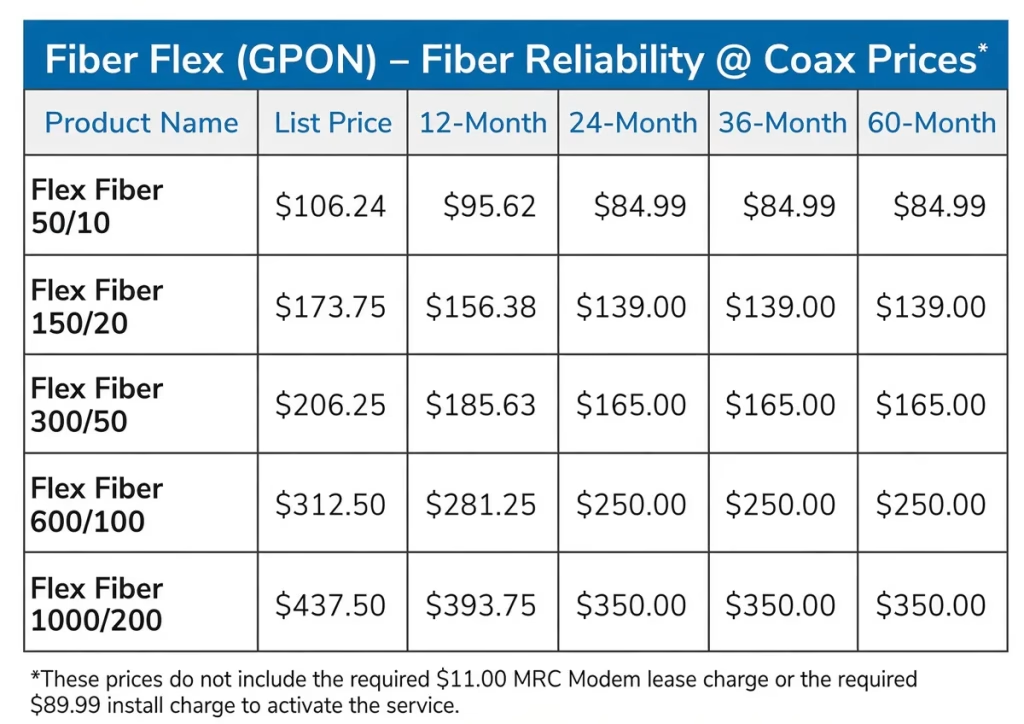
Fiber Flex from business WoW 843.460.4575
However, availability varies by address. In some areas, another connection type may be the most practical option. In others, fiber may already be available, but the bottleneck sits inside the home. Replacing an outdated router, extending wired connections, or installing a better Wi-Fi layout may produce the most immediate improvement.
Cost is another consideration. The highest available speed tier is not automatically the best value. A well-designed network on an appropriately sized plan usually performs better than an expensive connection feeding outdated equipment. The most useful approach is to match the service and infrastructure to actual work patterns, with room for growth.
Build a home office that works like a business location
A reliable home office starts with a clear layout. The main desk should have dependable access to the network, whether through wired cabling or strong, tested Wi-Fi. Network hardware should be placed where it can serve the space effectively, rather than hidden in a corner that limits coverage. Cables should be organized and routed cleanly so the workspace remains professional and easy to maintain.
For executives and business owners, a home office can also become a key continuity site. If weather, building access, construction, or another disruption affects the main office, the ability to work securely from home keeps operations moving. That makes network planning more than a convenience project. It becomes part of business continuity.
This same thinking applies to hybrid teams. A company may not control every employee’s home setup, but it can establish practical standards for connectivity, router security, VPN access, and wired workstation connections. Supporting those standards reduces recurring technology issues and gives employees a better experience.
A single source for fiber, cabling, Wi-Fi, and network setup
Managing remote-work connectivity can involve several moving parts: the internet provider, the incoming fiber connection, internal cabling, network hardware, Wi-Fi coverage, and security settings. Coordinating each piece separately can slow down a project and make troubleshooting harder when something is not working as expected.
All Wiring Needs helps businesses and homeowners address the physical network infrastructure and the connectivity plan together. That can include evaluating work areas, installing structured cabling, setting up routers, switches, and access points, improving Wi-Fi coverage, and helping source appropriate ISP or telecom options. The objective is simple: a network that supports the way you actually work, without unnecessary disruption.
If your remote office has outgrown a consumer-grade setup, start with an assessment of the connection, equipment, coverage, and security requirements. A few focused improvements can turn a frustrating work-from-home arrangement into a dependable place to serve customers, collaborate with your team, and keep business moving. We are a business internet broker that is free of charge to you —–> https://allwiringneeds.com/dia
#WorkFromHome #RemoteWork #HybridWork #HomeOffice #FiberInternet #BusinessFiber #CharlestonSC #CharlestonBusiness #BusinessInternetBroker #DIA #FiberFlex #NetworkInfrastructure #StructuredCabling #Cat6A #WiFi #AccessPoints #BusinessContinuity #NetworkSecurity #ReliableInternet #WorkFromHomeSetup